MG05
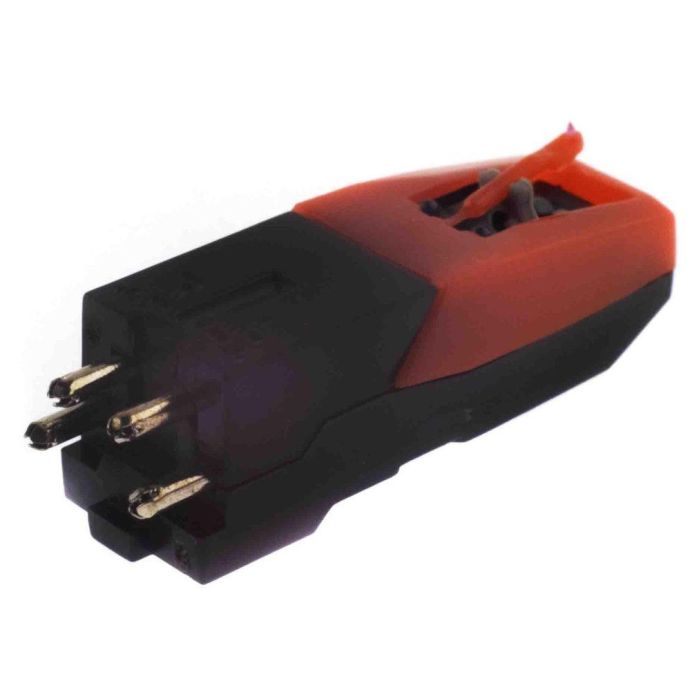
Replacement ceramic cartridge suitable with ION CZ-800-10, Numark Cr800 and
more.
This
replacement ceramic cartridge is a perfect fit for your Classic LP, iPT01,
iPTUSB, iPTUSB LE, Max LP, or Mobile LP and many other ION turntables (see
list)
To Replace Stylus
Grasp both sides of the stylus
and pull forward to remove stylus
Grasp both sides of the stylus
and slide up and back to attach stylus
To Replace Cartridge
Remove
stylus from old Cartridge
Grab headshell with thumb under
front tab and index finger on rear of head shell with left hand.
Grab old cartridge with right
thumb and index finger. Carefully Pull down and forward with right hand
while while pulling up with left hand.
Carefully disconnect wires from
rear of cartridge pulling from metal tabs.
Remove stylus guard and stylus
from new cartridge
Connect wires on new cartridge.
the single metal connector with black wires goes on the bottom posts that
are closer together.
From rear view, as you would
install the cartridge – The red wire goes on the right upper post, the
white wire goes on the left upper post.
Reconnect cartridge to
headshell by placing cartridge beneath headshell with thumb below
cartridge and index finger on top of headshell.
Carefully squeeze the two
together. a ‘light’ snap occurs and the cartridge should fit snug.
Reattach new stylus to new
cartridge.
Fits all
ION turntables that use a ceramic cartridge (see following list):
Classic
LP
Max
LP
Mobile
LP
iPTUSB
Archive
LP
Forever
LP
Live
LP
Power
Play
Quick
Play Flash
Quick
Play LP
Vinyl
Motion
Vinyl
Motion Deluxe
Air
LP
Duo
Deck
iLP
LP 2
GO
CD
Direct
iProfile
Profile
LP
Profile
Pro
*TTUSB,
TTUSBDC, LP2CD, Select LP use a magnetic cartridge and are not compatible.
MG05
Replacement ceramic cartridge suitable with ION CZ-800-10, Numark Cr800 and
more.
This
replacement ceramic cartridge is a perfect fit for your Classic LP, iPT01,
iPTUSB, iPTUSB LE, Max LP, or Mobile LP and many other ION turntables (see
list)
To Replace Stylus
Grasp both sides of the stylus
and pull forward to remove stylus
Grasp both sides of the stylus
and slide up and back to attach stylus
To Replace Cartridge
Remove
stylus from old Cartridge
Grab headshell with thumb under
front tab and index finger on rear of head shell with left hand.
Grab old cartridge with right
thumb and index finger. Carefully Pull down and forward with right hand
while while pulling up with left hand.
Carefully disconnect wires from
rear of cartridge pulling from metal tabs.
Remove stylus guard and stylus
from new cartridge
Connect wires on new cartridge.
the single metal connector with black wires goes on the bottom posts that
are closer together.
From rear view, as you would
install the cartridge – The red wire goes on the right upper post, the
white wire goes on the left upper post.
Reconnect cartridge to
headshell by placing cartridge beneath headshell with thumb below
cartridge and index finger on top of headshell.
Carefully squeeze the two
together. a ‘light’ snap occurs and the cartridge should fit snug.
Reattach new stylus to new
cartridge.
Fits all
ION turntables that use a ceramic cartridge (see following list):
Classic
LP
Max
LP
Mobile
LP
iPTUSB
Archive
LP
Forever
LP
Live
LP
Power
Play
Quick
Play Flash
Quick
Play LP
Vinyl
Motion
Vinyl
Motion Deluxe
Air
LP
Duo
Deck
iLP
LP 2
GO
CD
Direct
iProfile
Profile
LP
Profile
Pro
*TTUSB,
TTUSBDC, LP2CD, Select LP use a magnetic cartridge and are not compatible.







Sign In
Create New Account